Recently I upgraded my Operating System to Windows 7 and downloaded latest drivers for my Lenovo G550 Video card that is Intel GMA 4500M. After successful installation of drivers, everything worked just fine but when I started playing some games at some lower resolution then the problem started. I noticed that windows 7 doesn’t allow the device drivers to expand the screen aspect ratio to touch the sides from all four sides.
This is a pretty common problem of those users who have Intel GMA Series graphics or their screen resolution is slightly wider that most of the games and applications support.
Solution:
There are two simple solutions to this problem.
Solution 1:
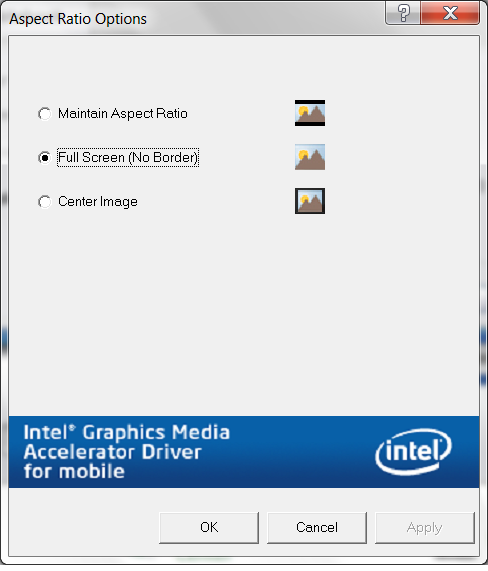
First is that there is an option provided by Intel Media Graphics Accelerator, using this option you can either fix the Screen aspect ratio or expand it. Path to this option is given below along with figure.
Control Panel -> Intel GMA Driver for Mobile ->Display Settings->Aspect Ratio Options
 Select Full Screen option and apply the changes.
However this solution doesn’t work in most of the cases as the Apply button is disabled and selected option doesn’t seem to work. So 2nd solution is applied for those 1st solution didn’t work.
Solution 2:
This solution surely works for most of the cases as I have applied this to many laptops. There are few very simple steps.
- Uninstall the Intel GMA drivers and program that you installed for Windows 7.
- Go the your Systems Drivers page on the web and Download the latest drivers and application for Windows Vista. This is the core solution yet found by me that vista drivers seem to work well and provide the solution of aspect ratio problem.
- Before installing the Vista compatible Drivers you have to add the compatibility to the drivers for Windows 7 before installing them. Locate the downloaded setup file then got to its properties by right clicking and then find the “Compatibility” tab at the top and check the Option “Run this program in compatibility mode” and select Windows Vista from Drop down list. Also check the option “Run as Administrator” and Apply the changes as shown in figure.
 4. A warning will appear telling you that you are going to install the old drivers as compared to the new installed one. proceed forward and install the drivers. Restart your PC.
If you find some problem then quickly restore your windows back to the old state.

That is it you are done with the solution. I hope this solution will help alot of people out there like me.
StumbleUpon |
Digg |
Reddit |
Tweet |
Facebook |
Technorati |
Delicious |
Ping.fm |
Slashdot